This guide provides a complete collection of Node.js Interview Questions and Answers for freshers, mid-level developers, and senior engineers. It includes 100+ questions covering Node.js fundamentals, asynchronous programming, Express.js, coding exercises, and system design scenarios.
Who this is for:
Freshers preparing for their first Node.js role, developers with 2–3 years of experience, and senior engineers preparing for advanced backend interview rounds.
What’s inside:
- Core Node.js concepts and definitions
- Asynchronous patterns (callbacks, promises, async/await)
- Express.js and REST API questions
- Coding interview tasks with examples
- System design and real-world architecture questions
How to use this guide:
Move through the questions level by level, practice the coding tasks, and use the system design section to prepare for high-difficulty rounds.
Table of Contents
Node.js Interview Questions and Answers for Freshers (0–1 Year)
Freshers are expected to understand the fundamentals of Node.js: how it works, why it’s used, the event loop, callbacks, promises, basic modules, npm, environment configuration, and simple debugging. Questions focus on clarity of concepts rather than production architecture.
What is Node.js?
Node.js is a runtime environment that executes JavaScript on the server side, built on Chrome’s V8 engine. Its non-blocking, event-driven architecture enables scalable handling of concurrent connections. It makes JavaScript a full-stack language, allowing front-end and back-end development using a unified skillset.
Explain the Event Loop in Node.js.
The event loop is the core mechanism that allows Node.js to perform non-blocking I/O. It continuously checks the call stack, callback queue, microtask queue, and timers queue to schedule execution. Rather than creating multiple threads, Node.js uses this model to handle thousands of concurrent operations efficiently.
What is the difference between synchronous and asynchronous programming in Node.js?
Synchronous code blocks execution until an operation completes, whereas asynchronous code returns control immediately and completes later. Node.js defaults to asynchronous behavior, enabling high throughput without blocking the main thread. Asynchrony is implemented using callbacks, promises, and async/await.
What are CommonJS and ES Modules?
CommonJS uses require() and module.exports and is synchronous. ES Modules use import and export and allow static analysis and optimizations. Node.js supports both, but ES Modules are encouraged for modern applications and future-proof codebases.
What is npm and why is it used?
npm is the Node Package Manager used to install and manage libraries and tools. It maintains a centralized registry for packages and handles dependency resolution. Developers can publish, version, and share reusable modules through npm.
What are callbacks in Node.js?
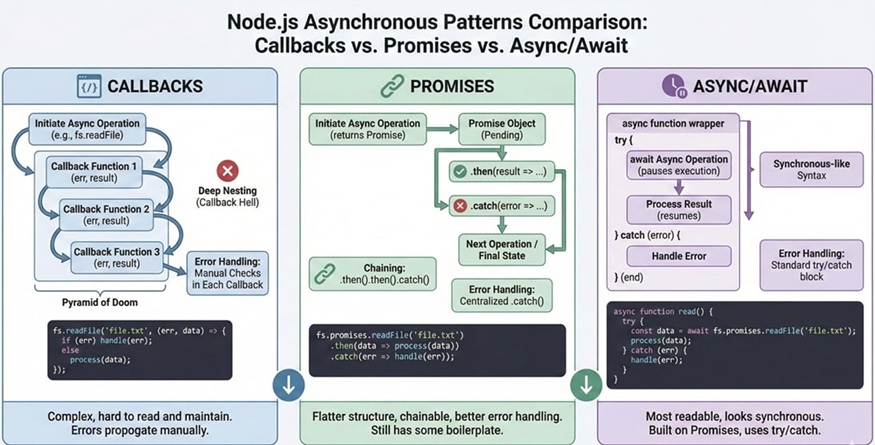
Callbacks are functions passed into other functions to execute after asynchronous operations complete. Node.js traditionally uses error-first callbacks, where the first argument is an error value and the second is the successful result. Misuse of callbacks can lead to callback hell, which is now avoided with promises and async/await.
Example:
fs.readFile('file.txt', 'utf8', (err, data) => {
  if (err) return console.error(err);
  console.log(data);
});
What are Promises?
Promises represent the eventual completion or failure of an asynchronous operation. They enable chaining and help prevent callback nesting. A promise can be in one of three states: pending, fulfilled, or rejected.
What is async/await?
async/await is syntactic sugar on top of promises, making asynchronous code look synchronous. It improves readability and error handling through try/catch blocks. It requires Node.js 7.6+ for native support.
Example:
async function readFile() {
  try {
    const data = await fs.promises.readFile('file.txt', 'utf8');
    console.log(data);
  } catch (err) {
    console.error(err);
  }
}
What is a Buffer in Node.js?
Buffers store raw binary data directly in memory. They are crucial for file operations, TCP streams, and handling image or video data. Unlike regular JavaScript strings, buffers allow manipulation of bytes directly.
What are Streams in Node.js?
Streams process data in chunks rather than loading entire files into memory. This makes them ideal for large files and data pipelines. Node.js provides several types: readable, writable, duplex, and transform streams.
Example:
const fs = require('fs');
fs.createReadStream('input.txt').pipe(fs.createWriteStream('output.txt'));
Explain process.nextTick() vs setImmediate().
process.nextTick() executes callbacks before the next event loop phase and takes priority over other tasks. setImmediate() executes callbacks on the check phase after I/O events are processed. Overusing nextTick() can starve the event loop.
What is Express.js?
Express.js is a minimal and flexible Node.js web framework. It simplifies routing, middleware configuration, and request-handling workflows. It is widely used for building REST APIs and server-side applications.
What are middleware functions in Express?
Middleware functions process requests before they reach route handlers. They can modify request/response objects, handle authentication, logging, error handling, and more.
Example middleware:
app.use((req, res, next) => {
  console.log(`Request received: ${req.url}`);
  next();
});
What is CORS in Express.js?
CORS (Cross-Origin Resource Sharing) allows servers to specify which origins can access their resources. Browsers enforce CORS rules to protect users from malicious cross-site requests.
Example:
const cors = require('cors');
app.use(cors());
How do you handle errors in Node.js?
Error handling involves using try/catch for synchronous and async/await code, or .catch() for promises. For global exceptions, handlers like process.on('uncaughtException') and process.on('unhandledRejection') may be used. Production systems typically integrate centralized error logging and monitoring tools.
What is the difference between Node.js and a browser JavaScript environment?
Node.js runs JavaScript on the server, gives access to APIs like fs, http, crypto, and has no DOM.
Browsers run JavaScript on the client and provide DOM, window, and UI APIs that Node.js does not have.
What is the role of libuv in Node.js?
libuv is the C library that powers Node’s event loop, non-blocking I/O, thread pool, and asynchronous timers.
It enables Node.js to handle thousands of concurrent connections efficiently.
What is the Node.js REPL?
REPL stands for Read–Eval–Print–Loop, an interactive shell used to:
- Quickly test code
- Debug small snippets
- Evaluate expressions
You start it by typingnodein the terminal.
What is a global object in Node.js? Give an example.
The global object is available everywhere without importing.
Example:
globalprocess__dirnameBuffer
Unlike browsers where the global object iswindow.
What does package-lock.json do?
package-lock.json locks the exact versions of installed dependencies, ensuring:
- Consistent installations across machines
- Faster installs
- Secure version tracking
It is automatically generated by npm.
What is the use of the fs module in Node.js?
The fs (File System) module allows Node.js to read, write, update, delete, and stream files.
It provides both synchronous and asynchronous methods.
What is the purpose of module.exports?
module.exports allows you to export functions, objects, or variables from a Node.js module so they can be imported using require() in other files.
What is the difference between require() and import?
require() → CommonJS, synchronous, older Node.js modules
import → ES Modules, static analysis, modern standard
Newer Node.js projects encouraged to use ESM (import).
What is middleware in Express.js (fresher-level answer)?
Middleware is a function that runs before your route handler and can:
- Modify
reqorres - Log details
- Validate input
- Authenticate users
It must callnext()to continue the request flow.
What is nodemon used for?
nodemon automatically restarts your Node.js application whenever files change.
It improves development speed and avoids manual restarts.
Node.js Interview Questions for 2–3 Years Experience
Developers with 2–3 years of experience are expected to understand asynchronous patterns deeply, manage Express middleware, debug performance issues, work with environment variables, and handle basic production scenarios like logging and error handling. They should build moderately complex APIs and troubleshoot common Node.js issues confidently.
Explain non-blocking I/O in Node.js.
Non-blocking I/O allows Node.js to initiate an I/O task (like file read or HTTP request) and continue executing other operations without waiting for completion. When the task finishes, the callback or promise is resolved. This design is why Node.js performs efficiently under high concurrency.
Describe event-driven architecture in Node.js.
Event-driven architecture uses events and listeners instead of sequential blocking steps. Node.js fires events such as I/O completion, network responses, and timers, which are handled asynchronously. This model allows better scalability compared to multi-threaded blocking architectures.
How does the V8 engine execute JavaScript?
V8 compiles JavaScript to native machine code using JIT (Just-In-Time) compilation. It optimizes frequently used code paths and uses garbage collection for memory management. Node.js benefits from V8’s speed and modern JavaScript features.
What is the purpose of package.json?
package.json describes project metadata, dependencies, scripts, supported Node versions, and configuration options. It ensures consistent installation via semantic versioning rules and helps teams maintain reliable builds and automation tasks.
What is semantic versioning in npm?
Semantic versioning uses a three-part format: MAJOR.MINOR.PATCH.
- MAJOR releases introduce breaking changes
- MINOR releases add features without breaking compatibility
- PATCH releases fix bugs
npm uses symbols: ^allows minor updates~allows patch updates
What is Express middleware chaining and how does it work?
Middleware chaining occurs when multiple functions are executed in sequence using next(). This enables separating concerns such as authentication, logging, rate limiting, and request validation. Each middleware must either call next() or end the response to avoid stalling the request.
How do you secure environment variables in Node.js?
Environment variables are stored in .env files and loaded using packages like dotenv. They must not be committed to Git. Secure deployment environments (Docker secrets, CI/CD pipelines, cloud key storage) manage sensitive values in production.
Example:
require('dotenv').config();
const dbUser = process.env.DB_USER;
What is the difference between process.nextTick() and microtasks?
process.nextTick() queues callbacks ahead of microtasks like resolved promises. Both run before the event loop continues, but excessive use of nextTick() can block I/O from executing. Microtasks belong to the standard JavaScript event loop specification.
What is a memory leak in Node.js and how do you detect it?
Memory leaks occur when unused objects remain referenced and are never garbage collected. Common causes include global variables, long-lived timers, or caching without eviction. Tools like Chrome DevTools, clinic.js, and heap snapshots help detect and analyze leaks.
How do you use clustering in Node.js?
Clustering allows multiple Node.js worker processes to share the same port and utilize multiple CPU cores. It increases throughput for CPU-bound workloads. The master process manages worker lifecycle.
Example:
const cluster = require('cluster');
const http = require('http');

if (cluster.isMaster) {
  for (let i = 0; i < 4; i++) cluster.fork();
} else {
  http.createServer((req, res) => res.end('OK')).listen(3000);
}
What is the difference between res.send() and res.json() in Express?
res.send() sends various data types (strings, buffers, objects).
res.json() ensures the output is JSON-formatted and sets Content-Type: application/json.
Under the hood, Express often calls res.json() when objects are passed to res.send().
What is the purpose of using a reverse proxy like Nginx with Node.js?
Reverse proxies add critical production features:
- SSL/TLS termination
- Load balancing
- Request buffering
- Static file serving
- Protection from slow-client attacks
Node.js alone is not optimal for these tasks.
Explain the concept of backpressure in streams.
Backpressure occurs when a writable stream receives data faster than it can process it. Node.js handles this by returning false from write() and emitting a drain event when ready. Proper backpressure management prevents memory overload.
What is the difference between fs.readFile() and streams?
fs.readFile() loads the whole file into memory, suitable for small files.
Streams process data in chunks, enabling efficient use of memory and supporting large files or real-time data pipelines.
How do you debug Node.js applications?
Debugging can be done via:
node --inspectwith Chrome DevTools- VS Code built-in debugger
- Breakpoints using
debuggerstatements - Logging tools like Winston or Pino
- Profiling using Node’s inspector or tools like Clinic.js
Node.js Interview Questions for 4 Years Experience
By 4 years of experience, developers are expected to handle production-grade applications, understand performance tuning, optimize APIs, implement security best practices, write unit/integration tests, handle scaling techniques, work with clusters/worker threads, and troubleshoot live issues. Interviewers expect strong practical fluency and reasoning skills, not just definitions.
What are the main phases of the Node.js event loop, and why does it matter?
The event loop has phases such as timers, pending callbacks, idle/prepare, poll, check, and close callbacks. Each phase processes specific types of callbacks. Understanding these phases helps developers predict when async functions execute, debug bottlenecks, avoid starvation, and tune performance when handling time-sensitive operations.
How do you optimize API performance in Node.js?
Optimizing involves reducing synchronous/blocking code, leveraging connection pooling, optimizing database queries, implementing caching layers (Redis), compressing responses, and using streams instead of buffering large data. Load testing with tools like Artillery or Locust helps validate improvements. Profiling CPU usage and event loop delay is also essential.
What are Worker Threads, and when should they be used?
Worker Threads allow running CPU-intensive tasks in separate threads to avoid blocking the event loop. They’re useful for encryption, image processing, compression, mathematical computations, or heavy data parsing. Node.js remains single-threaded for JavaScript but offloads heavy work through workers.
Example:
const { Worker } = require('worker_threads');
new Worker('./task.js', { workerData: 123 });
Explain the concept of async context and why it matters for logging/tracing.
Async context preserves variable state across asynchronous operations. Libraries like AsyncLocalStorage help maintain request-level information such as user ID, trace ID, or correlation ID. This is critical for debugging multi-tenant applications and generating meaningful logs in distributed systems.
How do you manage configuration across environments (dev, test, prod)?
Use environment variables with .env files, and tools like dotenv, config packages, or secret managers. Avoid hardcoding values or committing secrets. Use different configs per environment and apply validation to avoid startup failures.
What are common security vulnerabilities in Node.js applications?
Common issues include:
- Command injection
- SQL/NoSQL injection
- Prototype pollution
- Insecure JWT handling
- Misconfigured CORS
- Missing rate limiting
Security best practices include input validation, escaping user input, using helmet middleware, limiting payload sizes, and rotating secrets.
How do you implement rate limiting in Node.js?
Rate limiting protects APIs from abuse and DDoS-like patterns. Tools like express-rate-limit, Redis-based limiters, or API gateway features track request counts per user/IP. Limits are commonly based on requests per minute or token-bucket algorithms.
Explain backpressure in streams and how to handle it.
Backpressure occurs when the receiving side cannot handle incoming data fast enough. Developers detect this when writable.write() returns false. Proper handling involves pausing the readable stream and resuming it on the drain event to prevent memory overflow.
What is event loop blocking, and how do you detect it?
Blocking occurs when CPU-heavy operations run on the main thread, preventing async tasks from executing. You detect it by measuring event loop latency using tools like libuv metrics, New Relic, or the blocked-at module. Solutions include using worker threads or breaking tasks into smaller chunks.
How do you handle uncaught exceptions and unhandled promise rejections?
Use process.on('uncaughtException') and process.on('unhandledRejection') for logging and graceful shutdown. These events indicate programming errors, so the safest approach is restarting the application using a process manager like PM2 or Docker because the app may enter an inconsistent state.
What testing strategies should a mid-level Node.js developer know?
Developers should write unit tests (Jest/Mocha), integration tests (Supertest for APIs), mocks/stubs for isolating features, and E2E tests. They should understand test coverage, dependency injection for testing, and mocking heavy integrations like DB or external APIs.
How do you design an Express middleware for authentication?
Middleware checks for tokens (JWT or session), verifies them, attaches the user object to the request, and forwards the request with next(). Invalid tokens should result in 401 responses. The middleware must avoid heavy synchronous tasks to prevent blocking.
What is the purpose of using Redis with Node.js?
Redis helps with caching, session management, rate limiting, pub/sub communications, and queue management (BullMQ). It significantly improves performance when reducing database load or implementing event-driven patterns.
How do you troubleshoot memory leaks in Node.js?
Steps include:
- Capturing heap snapshots
- Tracking unreferenced objects
- Checking event listeners for growth
- Monitoring allocated buffers
- Using Chrome DevTools or Clinic.js
Fixing involves removing unnecessary global references, cleaning timers, using weak references, and optimizing caching systems.
How do you version and evolve APIs in Node.js?
Use versioned routes such as /api/v1 and /api/v2. Use backward-compatible changes when possible. Apply contract testing and documentation through Swagger/OpenAPI. Deprecation notices should be communicated clearly in headers and logs.
Node.js Interview Questions for Experienced (5–7 Years)
Developers at 5–7 years of experience are expected to design scalable architectures, optimize performance, implement comprehensive error handling, apply security standards, integrate observability tools, and manage production deployments. They should understand Node.js internals, event loop nuances, distributed systems patterns, and advanced API design strategies.
How do you design a scalable Node.js application?
Scalable Node.js applications rely on horizontal scaling, stateless architecture, caching layers, and worker queues. Load balancers distribute traffic across multiple Node.js processes or containers. Using microservices or modular monolith patterns ensures components scale independently. Caching with Redis/Memcached reduces database load, and CI/CD pipelines ensure reliable deployments.
What are the main performance bottlenecks in Node.js, and how do you address them?
Common bottlenecks include blocking CPU operations, synchronous code paths, slow database queries, excessive logging, and memory leaks. Solutions include delegating CPU work to workers, optimizing async flows, improving DB indexing, using batching, enabling compression, and profiling with tools like Clinic.js or Node’s built-in profiler. Monitoring event loop lag helps detect hotspots.
Discuss advanced event loop behavior and how it impacts application performance.
The event loop processes multiple queues: timers, microtasks, I/O callbacks, immediates, and close events. Heavy microtasks (promise chains) can starve I/O, causing latency spikes. Certain operations (crypto, regex backtracking, loops) block the loop, degrading throughput. Experience is shown through understanding phase ordering and tuning how async tasks are scheduled.
How do you implement distributed caching in Node.js?
Distributed caching uses systems like Redis or Memcached to share cached data across multiple servers or containers. Node.js applications fetch cached results before hitting primary databases. Cache invalidation strategies include TTL-based expiry, write-through caching, or event-driven invalidation via pub/sub. Maintaining cache consistency is critical in multi-instance environments.
How do you handle high-throughput logging in Node.js?
High-throughput systems require structured logging (JSON), asynchronous logging via tools like pino, log rotation, and shipping logs to systems like ELK, Loki, or Cloud Logging. Logging must be non-blocking to avoid stalling the event loop. Request correlation is implemented using AsyncLocalStorage for trace IDs.
What are Worker Threads vs Clustering, and when do you use each?
Clustering spawns multiple Node.js processes to utilize CPU cores and handle more HTTP requests. Worker Threads run CPU-heavy tasks inside the same process without blocking the event loop. Use clustering for scaling network workloads, and worker threads for CPU-intensive operations like encryption or data parsing.
How do you design an authentication system in Node.js beyond basic JWT?
Advanced systems implement token rotation, refresh tokens, sliding expiration, distributed session stores, blacklist/whitelist management, and MFA workflows. For scalability, use Redis for session storage and integrate OAuth providers. Endpoints must handle replay attack prevention, rate limiting, IP throttling, and CSRF protection.
What are the best practices for securing a Node.js application in production?
Key practices include:
- Using Helmet for security headers
- Sanitizing and validating all inputs
- Preventing NoSQL injection
- Implementing rate limits and IP throttling
- Rotating secrets and tokens
- Enforcing HTTPS and secure cookies
- Limiting payload sizes
- Running Node.js as a non-root user
- Regular dependency scanning with npm audit or Snyk
How do you design fault-tolerant Node.js services?
Fault tolerance includes retry mechanisms, exponential backoff, circuit breakers, bulkheads, connection pooling, and graceful restarts. Using message queues (RabbitMQ, Kafka) decouples components and enables retryable workflows. Health checks and readiness probes ensure services only receive traffic when stable.
Discuss strategies for optimizing database interactions in Node.js.
Techniques include:
- Connection pooling
- Using indexes effectively
- Reducing N+1 queries
- Implementing batching or data loaders
- Query caching
- Handling pagination efficiently
- Avoiding over-fetching in ORMs
Performance relies on profiling slow queries and monitoring DB metrics.
How do you design APIs that support high concurrency?
Node.js APIs should be stateless, idempotent, and optimized for low latency. Using streaming for large responses prevents memory overload. Circuit breakers ensure slow downstream dependencies don’t degrade API performance. Rate limits, caching layers, and asynchronous workflows help support millions of requests.
How do you ensure observability in Node.js applications?
Observability requires logs, metrics, and traces. Use Prometheus (metrics), Grafana (dashboards), OpenTelemetry (tracing), and structured logs with correlation IDs. Instrumentation captures latency, event loop delay, CPU usage, heap usage, GC activity, and DB query timings. Alerting is configured for SLA violations.
What strategies help reduce cold starts in Node.js serverless environments?
Reduce startup time by avoiding heavy synchronous initialization, performing lazy loading of dependencies, and reducing bundle size. Persistent connections (DB pools) must be managed carefully. Keeping functions warm through scheduled invocations helps maintain responsiveness.
How do you handle graceful shutdowns in Node.js?
Graceful shutdown includes:
- Listening to signals like SIGTERM
- Stopping new incoming requests
- Finishing in-flight requests
- Closing DB connections
- Flushing logs
This avoids data corruption and supports zero-downtime deployments.
Example:
process.on('SIGTERM', () => {
  server.close(() => process.exit(0));
});
When would you choose microservices over a monolith in Node.js?
Microservices are preferred when different components require independent scaling, deployment, or technology choices. They support team autonomy and resilience but introduce operational complexity. Monoliths remain simpler for small teams and early-stage products. The best choice depends on domain boundaries, scaling requirements, and organizational maturity.
Node.js Interview Questions for Senior Developer (8–10+ Years)
Senior Node.js developers (8–10+ years) are expected to architect distributed systems, manage large-scale deployments, solve complex performance issues, design robust APIs, evaluate trade-offs, lead teams, and make technology decisions with a clear understanding of operational impact. Interviews at this level focus less on syntax and more on architecture, scaling, observability, and solving real-world engineering challenges.
How do you design a globally distributed Node.js system with low latency?
A senior engineer designs systems using edge locations/CDNs to serve static content, regional microservices for dynamic data, and global load balancers that route users to the nearest region. Caches (Redis, CDN edge caching) minimize round trips to origin servers. Data replication strategies (multi-region DBs with conflict resolution) and partitioning reduce latency. Decisions consider CAP theorem trade-offs between consistency and availability.
Explain in detail how to handle high concurrency, high throughput workloads in Node.js.
Strategies include horizontal scaling with container orchestration (Kubernetes), worker queues for async processing, intelligent connection pooling, and non-blocking async flows. Node.js excels at I/O-bound workloads but needs worker threads or offloaded services for CPU-heavy tasks. Optimizing event loop delay, reducing GC pressure, and minimizing context switching are key. Monitoring saturation signals drives scaling decisions.
What are the architectural trade-offs of microservices vs monoliths in Node.js?
Trade-offs include:
- Microservices advantages: independent deployments, fault isolation, polyglot freedom, targeted scaling.
- Microservices disadvantages: distributed complexity, debugging difficulty, higher infra cost, eventual consistency issues.
- Monolith advantages: simpler CI/CD, easier debugging, unified codebase.
- Monolith disadvantages: limited scalability, harder modularization, risk of large deployments.
A senior engineer evaluates domain boundaries, team autonomy, scaling patterns, and operational maturity before choosing.
How would you integrate Node.js with a streaming platform like Kafka for event-driven architecture?
A senior developer uses Kafka clients to produce and consume events, leveraging partitioning to achieve parallelism. Node.js consumers must handle backpressure, monitoring lag and ensuring idempotence. Schema registry ensures compatibility across event versions. Use cases include CQRS, asynchronous workflows, and event sourcing.
Describe how you diagnose event loop blocking in a large production environment.
Approaches include measuring event loop delay using metrics exporters, capturing CPU profiles, analyzing flamegraphs, and correlating logs with performance degradation. Blocked loop detectors and sampling profilers identify hotspots. When detected, tasks are restructured, offloaded to workers, or delegated to specialized services such as Go or Rust components.
How do you ensure resilience and fault tolerance in distributed Node.js applications?
Resilience patterns include circuit breakers, rate limiting, retries with exponential backoff, bulkheads, hedged requests, and graceful degradation. Services use health checks, rolling restarts, canary deployments, and automated failover via orchestrators like Kubernetes. Logs and metrics ensure issues are detected early.
What strategies do you use for designing scalable real-time systems using WebSockets or Socket.io?
Strategies include sharding connections across multiple instances, using Redis pub/sub for message fan-out, storing presence data in distributed caches, and ensuring sticky sessions via load balancers. Backpressure, connection lifecycle management, and topic-based routing are essential. Horizontal scaling requires externalizing state from in-memory storage.
How do you architect an API Gateway for Node.js microservices?
An API Gateway provides routing, aggregation, rate limiting, authentication, caching, and protocol translation. Node.js gateways (Express, Fastify, or dedicated tools like Kong/NGINX) should be stateless and horizontally scalable. Observability must be built-in: structured logs, distributed tracing, and request lifecycle telemetry.
Discuss performance tuning techniques for a Node.js application handling millions of requests.
Techniques include:
- Avoiding synchronous operations
- Using HTTP keep-alive
- Reducing middleware stack depth
- Optimizing JSON serialization/deserialization
- Implementing load shedding during overload
- Using Node’s native clustering
- Leveraging reverse proxies for caching/compression
Senior engineers balance performance with maintainability and operational complexity.
How do you perform advanced memory profiling—including heap, stack, and native bindings?
Tools used include Chrome DevTools, Heapdump, Clinic.js, and Node’s built-in inspector. Heap snapshots identify detached objects, large arrays, event listener leaks, and closure retention. Native memory leaks often require inspecting buffers, C++ add-ons, or third-party libraries. Continuous profiling in production helps catch leaks early.
How do you ensure consistency across distributed Node.js services?
Techniques include:
- Saga patterns
- Outbox patterns with message relay
- Idempotent operations
- Event versioning
- Distributed locks (Redis or Zookeeper)
Consistency levels vary across workloads; critical systems may require strong consistency while others embrace eventual consistency for scalability.
How do you design Node.js applications for multi-tenant architectures?
Multi-tenancy involves isolating data through schema-per-tenant, database-per-tenant, or row-level access control. Rate limits, resource quotas, and audit logs must be tenant-aware. AsyncLocalStorage stores tenant context across async operations. Security and data privacy are foundational concerns in such designs.
Explain the challenges of large-scale logging and tracing in Node.js systems.
Challenges include log volume, serialization overhead, network congestion, and log ingestion costs. Solutions involve sampling, batching logs, structured JSON logs, and pushing logs asynchronously. Distributed tracing through OpenTelemetry with trace propagation headers enables cross-service debugging.
Describe how Node.js interacts with containerized environments at scale.
Node.js applications run in containers with limited resources; CPU throttling, memory limits, and liveness/readiness probes must be configured. Log output streams to stdout for log collectors. Horizontal pod autoscaling reacts to CPU or custom metrics like request latency or event loop lag. Container start-up and shutdown hooks must synchronize with Node graceful shutdown logic.
How do you migrate a large Node.js codebase from CommonJS to ES Modules?
Steps include:
- Updating package.json to
"type": "module" - Converting require/module.exports to import/export
- Handling __dirname and __filename replacements
- Updating dependencies lacking ESM support
- Ensuring test suite compatibility
- Using dual-mode packaging for libraries
Gradual migration through hybrid modules minimizes risks.
Node.js Interview Questions for Experienced Professionals – System Design & Architecture
At this level, interviewers expect you to architect distributed systems, justify trade-offs, design fail-safe components, and understand data flows across multiple integrated services. Node.js becomes one component in a much larger ecosystem, and your decisions must align with scalability, latency, reliability, observability, and cost constraints.
Below are system design–oriented questions with in-depth, practical, and architecture-aware answers.
Design a real-time chat application using Node.js.
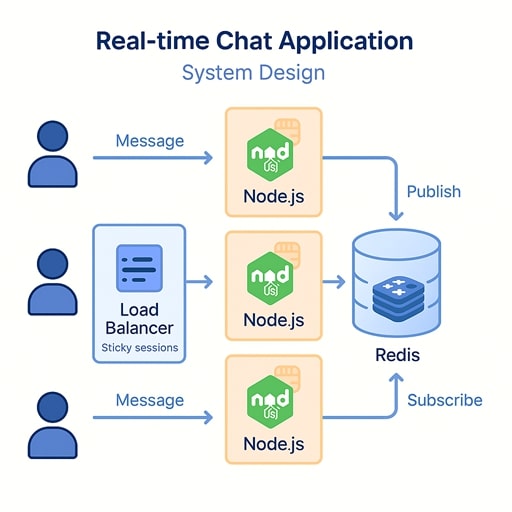
A real-time chat system requires persistent WebSocket connections. Node.js works well because of its asynchronous, non-blocking nature. You would use Socket.IO or native WebSockets for bi-directional communication. To scale horizontally, you need a shared state layer using Redis pub/sub or message queues to broadcast messages across distributed Node.js instances.
Key components:
- WebSocket gateway layer (Node.js-based)
- Redis or Kafka for message fan-out
- User presence tracking in Redis
- Load balancer with sticky sessions (or connection-aware routing)
- Database for message history (MongoDB, PostgreSQL, DynamoDB)
Trade-offs:
- Redis pub/sub is simple but not persistent
- Kafka supports durability but adds operational complexity
Design a high-throughput API gateway in Node.js.
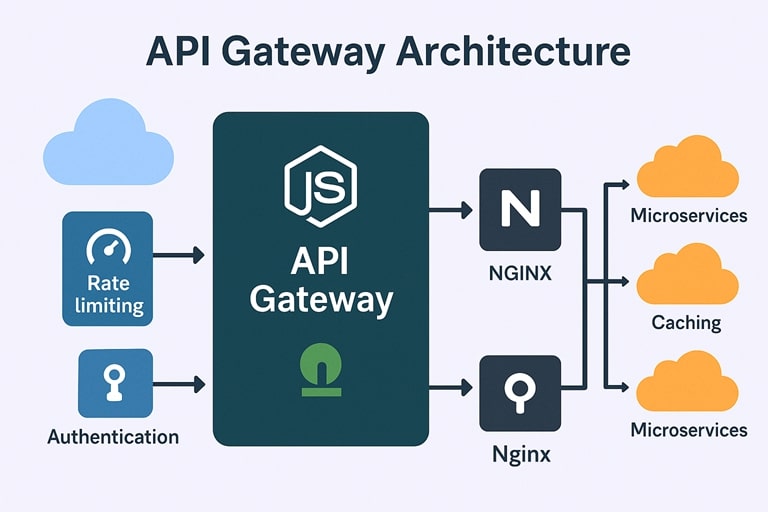
An API gateway aggregates traffic, handles routing, authentication, rate limiting, caching, logging, and sometimes response aggregation.
Key architectural elements:
- Non-blocking Node.js server (Express/Fastify)
- Reverse proxy layer (NGINX, Envoy) for TLS termination & client buffering
- Async middlewares for authentication, routing, and metrics
- Redis or in-memory LRU for caching hot endpoints
- Token bucket or leaky bucket algorithms for rate limiting
- Circuit breakers for slow downstream services
Performance considerations:
- Must avoid blocking operations
- Use streaming responses for large payloads
- Keep middleware stack minimal
Trade-offs:
- Node.js gateways are flexible but require tight performance tuning
- NGINX/Envoy are faster for low-level routing
Design a scalable job queue system in Node.js.
Job queues handle asynchronous workloads such as email sending, PDF generation, data processing, etc.
Key components:
- Producer services push jobs to Redis/Kafka/RabbitMQ
- Consumer workers in Node.js process these jobs
- Retry logic with exponential backoff
- Dead-letter queues for poison messages
- Horizontal scaling by increasing worker counts
- Monitoring with dashboards for queue depth, processing time, and failures
Node.js tools:
- BullMQ (Redis-based)
- RabbitMQ libraries (amqplib)
- KafkaJS for stream processing
Trade-offs:
- Redis queues = simple, low latency
- Kafka = more durable, complex
Design a rate limiting system for a large-scale Node.js API.
Rate limiting prevents abuse, attacks, and resource exhaustion.
Approaches:
- IP-based, user-based, or token-based limits
- Fixed window, sliding window, or token bucket algorithms
- Redis for distributed rate limiting across multiple Node instances
- Integration at the API gateway layer for efficiency
Key decisions:
- Enforcement method (429 responses vs. shadow mode)
- Burst handling vs. strict throttling
- Memory overhead vs. accuracy
Trade-offs:
- In-memory rate limiting is fast but not reliable in a distributed environment
- Redis-based rate limiting adds network latency
Design an event-driven microservices system using Node.js.
Node.js services subscribe to events using Kafka, AWS SNS/SQS, or Redis Streams.
Data flow:
- API service produces events when user actions occur
- Worker services consume events and trigger processes
- Saga orchestrations manage long-running workflows
- Event versioning ensures backward compatibility
Benefits:
- Loose coupling between services
- Scalability across independent components
- High throughput when using log-based systems (Kafka)
Challenges:
- Event consistency
- Idempotency
- Monitoring distributed flows
Design a file upload and processing service in Node.js.
Users upload files that must be validated, stored, and processed.
Architecture:
- Multi-part upload handled using multer or busboy
- Upload stream piped directly to cloud storage (S3, GCS)
- Background processing triggered via queues or cloud events
- If dealing with large files, use streaming throughout the pipeline
- Pre-signed URLs avoid server becoming a bottleneck
Scalability considerations:
- Do not buffer entire files in memory
- Use CDN for delivery
- Integrate virus scanning or content validation pipeline
Design a high-performance logging and monitoring system for Node.js services.
Logging must be structured, scalable, and real-time.
Components:
- Node.js services logging in JSON with correlation IDs
- Logs shipped to centralized systems (ElasticSearch, Loki, CloudWatch)
- Metrics via Prometheus
- Traces via OpenTelemetry
Operational needs:
- Sampling to reduce volume
- Batching for performance
- Instrumentation covering event loop delay, heap usage, downstream latencies
Trade-offs:
- Full tracing increases cost
- Sampling reduces detail
Design a server-side rendered (SSR) system using Node.js.
SSR is needed for SEO or first-load performance.
Architecture:
- Node.js SSR servers render pages per request
- CDN caches rendered pages
- Stateless rendering layer allows horizontal scaling
- React/Vue SSR frameworks like Next.js or Nuxt
Challenges:
- High CPU usage during SSR operations
- Cache invalidation
- Handling dynamic vs static segments
Mitigation:
- Use worker threads for CPU-heavy rendering
- Use edge caching for hot paths
Design a streaming analytics pipeline using Node.js.
Node.js processes continuous streams of events for real-time dashboards.
Flow:
- Event producers publish events (IoT devices, web clients, backend systems)
- Node.js stream processors transform/filter events
- Data stored in time-series DB (InfluxDB, TimescaleDB)
- Dashboard service consumes and visualizes results in real time
Node.js strength:
- Efficiently handles I/O-bound stream transformations
Limitations:
- Heavy computations should be moved to worker threads or compiled languages
How do you design for fault tolerance and graceful degradation in Node.js systems?
Fault tolerance involves:
- Retries with backoff
- Circuit breakers (stop calling broken dependencies)
- Bulkhead isolation (contain failures within compartments)
- Load shedding during overload scenarios
- Fallback responses or cached responses
- Distributed tracing to identify failing components
Graceful degradation ensures:
- Partial functionality remains available
- Non-critical paths degrade before core paths
Node.js Coding Interview Questions (With Code Examples)
Below are practical Node.js coding interview questions and answers you’re likely to see for junior, mid-level, and experienced roles. These Node.js coding interview questions focus on core skills: HTTP servers, middleware, async/await, streams, performance, and robustness.
Build a Simple HTTP Server in Node.js (Without Express)
Question:
Create a basic HTTP server in Node.js that listens on port 3000 and returns JSON { "message": "Hello Node" } for any request.
// server.js
const http = require('http');

const server = http.createServer((req, res) => {
  const data = { message: 'Hello Node' };

  res.statusCode = 200;
  res.setHeader('Content-Type', 'application/json');
  res.end(JSON.stringify(data));
});

const PORT = 3000;
server.listen(PORT, () => {
  console.log(`Server listening on http://localhost:${PORT}`);
});
Explanation:
This uses the built-in http module, which is often tested in Node.js interview questions for freshers. createServer receives a callback with req and res objects and you manually set status code, headers, and body. Returning JSON requires setting Content-Type: application/json and stringifying the object. For simple services or when you don’t want framework overhead, this low-level API is still useful.
Implement Basic Routing Logic in a Node.js HTTP Server
Question:
Extend the previous HTTP server to handle three routes:
GET /→{"message":"Home"}GET /health→{"status":"ok"}- Any other route →
{"error":"Not Found"}with status404.
const http = require('http');

const server = http.createServer((req, res) => {
  res.setHeader('Content-Type', 'application/json');

  if (req.method === 'GET' && req.url === '/') {
    res.statusCode = 200;
    return res.end(JSON.stringify({ message: 'Home' }));
  }

  if (req.method === 'GET' && req.url === '/health') {
    res.statusCode = 200;
    return res.end(JSON.stringify({ status: 'ok' }));
  }

  res.statusCode = 404;
  res.end(JSON.stringify({ error: 'Not Found' }));
});

server.listen(3000);
Explanation:
This shows manual routing using req.method and req.url. Interviewers want to see if you understand how frameworks like Express work under the hood. For real-world apps, you would parse query strings, handle URL parameters, and likely use a router library, but this demonstrates core HTTP handling. This is a common Node.js interview question and answer for junior developers.
Implement Express Middleware for Logging Requests
Question:
Write a reusable Express middleware that logs method, URL, and response time for each request.
// loggerMiddleware.js
function logger(req, res, next) {
  const start = Date.now();

  res.on('finish', () => {
    const duration = Date.now() - start;
    console.log(`${req.method} ${req.originalUrl} ${res.statusCode} - ${duration}ms`);
  });

  next();
}

module.exports = logger;

// usage in app.js
const express = require('express');
const logger = require('./loggerMiddleware');

const app = express();
app.use(logger);

app.get('/', (req, res) => {
  res.send('Hello');
});

app.listen(3000);
Explanation:
Express middleware receives req, res, and next. You capture the start time, attach a finish listener on res, and then log details once the response is sent. This pattern is common for logging, metrics, and performance monitoring. For experienced roles, interviewers often ask you to write custom middleware to test your understanding of the request–response lifecycle.
Create an Error-Handling Middleware in Express
Question:
Implement a global error-handling middleware in Express that returns JSON errors and integrate it with a route using async/await.
// errorHandler.js
function errorHandler(err, req, res, next) {
  console.error(err);
  const status = err.status || 500;
  res.status(status).json({
    error: {
      message: err.message || 'Internal Server Error',
      status,
    },
  });
}

module.exports = errorHandler;

// app.js
const express = require('express');
const errorHandler = require('./errorHandler');

const app = express();

app.get('/user', async (req, res, next) => {
  try {
    // simulate async failure
    throw new Error('User not found');
  } catch (err) {
    err.status = 404;
    next(err);
  }
});

app.use(errorHandler);

app.listen(3000);
Explanation:
Error-handling middleware has four parameters: (err, req, res, next). In async/await routes, you typically use try/catch and call next(err) to delegate to the error handler. Returning standardized JSON error responses is important for API clients and simplifies debugging. For Node.js interview questions for experienced developers, robust error-handling strategy is a key topic.
Read a Large File Using Streams (Avoid Loading Entire File in Memory)
Question:
Write Node.js code to read a large file using a readable stream and count how many lines it has without loading it fully into memory.
const fs = require('fs');
const readline = require('readline');

async function countLines(filePath) {
  const stream = fs.createReadStream(filePath, { encoding: 'utf8' });
  const rl = readline.createInterface({ input: stream, crlfDelay: Infinity });

  let count = 0;
  for await (const line of rl) {
    count++;
  }

  return count;
}

countLines('./bigfile.txt')
  .then((lines) => console.log(`Lines: ${lines}`))
  .catch(console.error);
Explanation:
Using fs.createReadStream avoids loading the entire file into memory, which is crucial for large files in production. The readline module lets you iterate over lines asynchronously using for await...of. This pattern demonstrates an understanding of Node.js streams, async iteration, and memory-efficient processing. Senior Node.js interview questions and answers often test these stream-based solutions for performance and scalability.
Implement a Simple Transform Stream (Uppercase Converter)
Question:
Create a transform stream that converts incoming text data to uppercase and pipe data from stdin to stdout using this stream.
const { Transform } = require('stream');

class UpperCaseStream extends Transform {
  _transform(chunk, encoding, callback) {
    const upper = chunk.toString().toUpperCase();
    this.push(upper);
    callback();
  }
}

const upperStream = new UpperCaseStream();

process.stdin.pipe(upperStream).pipe(process.stdout);
Explanation:
Transform streams both read and write data, modifying it along the way. Here, _transform receives chunks, converts them to uppercase, and pushes the transformed data downstream. Piping from stdin to stdout through this stream shows how Node’s stream pipeline works. This is a solid example in Node.js coding interview questions for demonstrating understanding of the streams API beyond just file reading.
Handle Async/Await with Proper Error Handling and Timeouts
Question:
Write a function fetchWithTimeout(promise, ms) that rejects if the given promise doesn’t resolve within ms milliseconds. Use async/await and Promise.race.
function timeout(ms) {
  return new Promise((_, reject) => {
    setTimeout(() => reject(new Error(`Timed out after ${ms}ms`)), ms);
  });
}

async function fetchWithTimeout(promise, ms) {
  return Promise.race([promise, timeout(ms)]);
}

// usage example
async function main() {
  try {
    const result = await fetchWithTimeout(
      new Promise((resolve) => setTimeout(() => resolve('OK'), 1000)),
      500
    );
    console.log(result);
  } catch (err) {
    console.error(err.message); // Timed out after 500ms
  }
}

main();
Explanation:
Promise.race lets you compete a normal async operation with a timeout promise that rejects. This pattern is common in production Node.js APIs to avoid hanging requests or long external calls. The function is reusable and works with any promise, not just HTTP requests. For Node.js interview questions for experienced professionals, showing such patterns demonstrates you understand reliability and responsiveness.
Implement Caching in Node.js Using an In-Memory Map
Question:
Implement a simple in-memory cache for a function getUser(id) so repeated calls with the same id return cached data instead of hitting the database (simulated).
const cache = new Map();

async function fetchUserFromDB(id) {
  // simulate slow DB call
  await new Promise((resolve) => setTimeout(resolve, 200));
  return { id, name: `User ${id}` };
}

async function getUser(id) {
  if (cache.has(id)) {
    return cache.get(id);
  }

  const user = await fetchUserFromDB(id);
  cache.set(id, user);
  return user;
}

// usage
(async () => {
  console.time('first');
  console.log(await getUser(1)); // slow
  console.timeEnd('first');

  console.time('second');
  console.log(await getUser(1)); // fast, cached
  console.timeEnd('second');
})();
Explanation:
This uses a simple Map to cache DB results by ID, reducing repeated work and improving performance. In interviews, you may be asked to also handle invalidation, TTLs, or max size limits (LRU). Caching is a key performance tuning technique, especially in API-heavy Node.js services. Senior Node.js interview questions often extend this to distributed caches like Redis and discuss trade-offs.
Use Cluster Module to Utilize All CPU Cores
Question:
Write a minimal example using Node’s cluster module to fork workers equal to the number of CPU cores, each running an HTTP server.
const cluster = require('cluster');
const os = require('os');
const http = require('http');

if (cluster.isMaster) {
  const numCPUs = os.cpus().length;
  console.log(`Master ${process.pid} is running`);
  console.log(`Forking for ${numCPUs} CPUs`);

  for (let i = 0; i < numCPUs; i++) {
    cluster.fork();
  }

  cluster.on('exit', (worker) => {
    console.log(`Worker ${worker.process.pid} died. Spawning a new one.`);
    cluster.fork();
  });
} else {
  const server = http.createServer((req, res) => {
    res.end(`Handled by worker ${process.pid}\n`);
  });

  server.listen(3000, () => {
    console.log(`Worker ${process.pid} started`);
  });
}
Explanation:
cluster.isMaster distinguishes the master process from worker processes. The master forks new workers, each running the HTTP server and sharing the same port. This lets you use all CPU cores in a multi-core machine, improving throughput for CPU-bound tasks. Node.js interview questions for senior developers often ask about clustering vs worker threads and related trade-offs.
Implement a Background Job Queue Using setImmediate and an Array
Question:
Create a simple in-process job queue where jobs are added with addJob(fn) and executed asynchronously in FIFO order without blocking the main logic.
const queue = [];
let processing = false;

function processQueue() {
  if (processing) return;
  processing = true;

  setImmediate(() => {
    while (queue.length) {
      const job = queue.shift();
      try {
        job();
      } catch (err) {
        console.error('Job failed:', err);
      }
    }
    processing = false;
  });
}

function addJob(fn) {
  queue.push(fn);
  processQueue();
}

// usage
console.log('Start');
addJob(() => console.log('Job 1'));
addJob(() => console.log('Job 2'));
console.log('End');
Explanation:
This job queue collects functions and executes them later using setImmediate, which schedules work after the current event loop phase. It ensures the main application flow can continue without being blocked by job processing. Real systems use libraries like Bull or agenda with Redis for persistence and distributed workers, but this demonstrates the core idea. This fits into Node.js interview questions and answers focused on event loop and async patterns.
Build a Minimal Express-Based REST API with Validation
Question:
Create an Express route POST /users that validates name and email in req.body, returning 400 if invalid and 201 with the created user if valid.
const express = require('express');
const app = express();

app.use(express.json());

app.post('/users', (req, res) => {
  const { name, email } = req.body;

  if (!name || !email || typeof name !== 'string' || typeof email !== 'string') {
    return res.status(400).json({ error: 'Invalid input' });
  }

  const user = { id: Date.now(), name, email };
  // normally you’d save to DB here
  res.status(201).json(user);
});

app.listen(3000);
Explanation:
This demonstrates basic REST API handling: parsing JSON, validating input, returning appropriate HTTP status codes. Interviewers look for clean validation logic and correct use of 400 vs 201. In more advanced roles, they may ask you to integrate a validation library (e.g., Joi, Zod) or to structure the code using services and controllers. This kind of API creation is fundamental in Node.js interview questions for freshers to mid-level developers.
Implement a Graceful Shutdown for an HTTP Server
Question:
Write code that starts an HTTP server and gracefully shuts it down when it receives a SIGINT (Ctrl+C), ensuring no new connections are accepted and existing ones finish.
const http = require('http');

const server = http.createServer((req, res) => {
  setTimeout(() => {
    res.end('Hello');
  }, 2000); // simulate slow work
});

const PORT = 3000;
server.listen(PORT, () => {
  console.log(`Server listening on ${PORT}`);
});

process.on('SIGINT', () => {
  console.log('Received SIGINT. Shutting down gracefully...');
  server.close((err) => {
    if (err) {
      console.error('Error closing server', err);
      process.exit(1);
    }
    console.log('Closed out remaining connections.');
    process.exit(0);
  });
});
Explanation:
Calling server.close stops the server from accepting new connections but lets existing ones complete. Handling SIGINT or SIGTERM signals is critical for production deployments (Docker, Kubernetes). This shows maturity in operational aspects of Node.js services, which is often tested for senior roles. Among system-oriented Node.js coding interview questions, graceful shutdowns highlight your awareness of real-world constraints.
Node.js Interview Tips, Mistakes to Avoid, and Preparation Checklist
This section helps job seekers prepare thoroughly for real-world Node.js interviews. It covers what interviewers expect, common mistakes candidates make, and a complete preparation blueprint for freshers, mid-level, and senior engineers.
1. Understand Core Internals, Not Just Frameworks
Interviewers often focus on event loop behavior, non-blocking I/O, callbacks vs promises, streams, and async patterns.
Framework knowledge (Express, NestJS) is helpful but not enough.
They expect you to explain how things work under the hood.
2. Practice Writing Code Without Libraries
Many Node.js coding interviews require:
- Building an HTTP server without Express
- Implementing routing manually
- Working with streams
- Error handling using plain Node APIs
This shows you understand Node.js itself, not just abstractions.
3. Show Clear Understanding of Error Handling
Senior interviewers expect you to demonstrate:
- try/catch with async/await
- centralized error handlers (Express)
- avoiding unhandled promise rejections
- graceful shutdown flows
Mismanaging errors is a major deal-breaker in backend engineering roles.
4. Demonstrate Production-Ready Thinking
Even mid-level roles expect awareness of:
- logging
- metrics
- event loop delay
- memory leaks
- debugging tools
- performance tuning
Senior engineers should discuss caching, distributed tracing, workers, and scaling.
5. Explain Practical Scenarios from Your Experience
Draw from your own projects. Interviewers prefer real-world examples such as:
- A memory leak you diagnosed
- How you optimized slow API routes
- How you reduced response time using Redis
- How you configured retries or circuit breakers
Experience gives stronger credibility than textbook definitions.
6. Use Precise Technical Language
Avoid vague answers like “Node.js is fast because it’s asynchronous.”
Instead say:
“Node.js uses an event-driven, non-blocking I/O model powered by libuv, which allows a single thread to handle thousands of concurrent requests efficiently.”
Precision reflects mastery.
7. Know Your Tools
Modern Node.js development commonly includes:
- Express or Fastify
- Jest or Mocha for testing
- Winston/Pino for logging
- Redis for caching
- Docker for containerization
- PM2 or Kubernetes for deployments
Interviewers like developers who know their ecosystem well.
Common Mistakes to Avoid in Node.js Interviews
1. Confusing Asynchronous Concepts
Candidates often mix up:
- microtask queue vs callback queue
- promises vs async/await
- setImmediate vs nextTick
Be prepared to discuss why these differ, not just memorize definitions.
2. Using Blocking Code in Examples
When writing code, avoid mistakes like:
- large loops
- JSON.parse on huge payloads
- synchronous file operations
Interviewers immediately see this as a misunderstanding of Node.js fundamentals.
3. Overusing Express Without Understanding It
Simple errors:
- improper middleware ordering
- forgetting to return after sending a response
- misusing async handlers without error propagation
Know the request lifecycle clearly.
4. Poor Error and Exception Management
Examples of red flags:
- letting unhandled rejections crash the app
- not using proper HTTP status codes
- returning inconsistent error formats
Good engineers demonstrate discipline with errors.
5. Ignoring Security
Interviewers expect awareness of common threats:
- injection attacks
- insecure CORS settings
- poor JWT handling
- missing rate limits
- exposing secrets
Security is one of the top reasons Node.js systems fail in real environments.
6. Weak Testing Practices
Poor test coverage or lack of API integration tests is a common weakness.
Know how to use:
- Jest + Supertest
- stubs/mocks
- dependency injection
Real production teams rely heavily on automated tests.
7. Not Knowing How to Diagnose Performance Problems
Senior candidates must know tools like:
- node –prof
- Chrome DevTools
- Clinic.js
- heap snapshot analysis
Being unable to diagnose slow or crashing services is a major red flag.
Node.js Interview Preparation Checklist
Use this checklist to prepare thoroughly for interviews.
Core Fundamentals
- Event loop phases
- Non-blocking architecture
- Promises, async/await, microtasks
- Streams, buffers, backpressure
- Modules (CommonJS vs ES Modules)
HTTP & Express
- Routing and middleware
- Error-handling middleware
- Request validation
- Authentication flows
- CORS
- File uploads
- REST API structure
Asynchronous Patterns
- callback → promise → async/await progression
- race conditions
- concurrency vs parallelism
- timeouts and retry patterns
- worker threads and clustering
Performance & Profiling
- event loop delay
- CPU profiling
- memory leak detection
- caching strategies
- load testing and benchmarking
System Design
Be ready to design:
- chat systems
- job queues
- API gateways
- file processing pipelines
- microservices
- distributed caching
- real-time analytics
Discuss trade-offs, not just diagrams.
Security
- input validation
- SQL/NoSQL injection prevention
- rate limiting
- JWT best practices
- secure cookies and HTTPS
- helmet and common hardening steps
Testing
- Jest or Mocha
- integration tests (Supertest)
- mocking/stubbing
- coverage reporting
DevOps Awareness
- Docker basics
- container health checks
- environment configuration
- graceful shutdowns
- deployment strategies (rolling, blue-green, canary)
Frequently Asked Questions (FAQ)
How many Node.js interview questions should I prepare?
Most candidates do well by preparing 40–60 core questions covering:
- Basics (event loop, callbacks, promises, modules)
- Express.js & REST APIs
- Asynchronous patterns
- Error handling
- Coding challenges
- Senior candidates should additionally review performance, scaling, testing, and system design questions.
Do I need to know frameworks like Nest.js for interviews?
For freshers, Nest.js is not required. Node.js + Express + core JavaScript fundamentals are enough. For mid-level and senior roles, Nest.js knowledge is often preferred because many companies use it for structured backend development, dependency injection, and large scalable applications.
Should I practice coding questions for Node.js interviews?
Absolutely. Many companies ask you to:
- Build a small HTTP server
- Implement middleware
- Use streams
- Write async/await functions
- Handle file I/O
These practical tasks demonstrate real-world Node.js skills better than theory alone.
How do I prepare for Node.js senior-level interviews?
Senior developers should focus on:
- Architecture patterns (microservices, queues, caching)
- Worker threads & clustering
- Security best practices
- Observability (logs, metrics, tracing)
- Scaling high-traffic APIs
- System design scenarios involving Node.js
What To Do Next
Now that you’ve mastered these Node.js Interview Questions, here’s how to take your preparation to the next level:
Practice Mock Interviews
Simulate real-world conversations with a friend or mentor. Focus on explaining concepts clearly and giving real examples from projects.
Build a Small Portfolio Project
Boost your confidence and resume by building:
- A REST API (CRUD + auth)
- A real-time chat app (WebSockets)
- A file upload + background processing system
- A Redis-powered caching example
These show practical Node.js skills better than theory.
Review Related Interview Guides
To round out your backend preparation, check out:
Official Node.js blog & release notes page
Node.js GitHub repository (source, issues, projects) for deeper insight / contribution history
Keep Practicing Coding Problems
Try solving 3–5 Node.js coding questions every day. This builds muscle memory and prepares you for take-home assignments.